Dr. Prius / Dr. Hybrid
- 3.0
- Rating
- 100.00K
- Installs
- Free
- Price

 Analysis by App-foxy
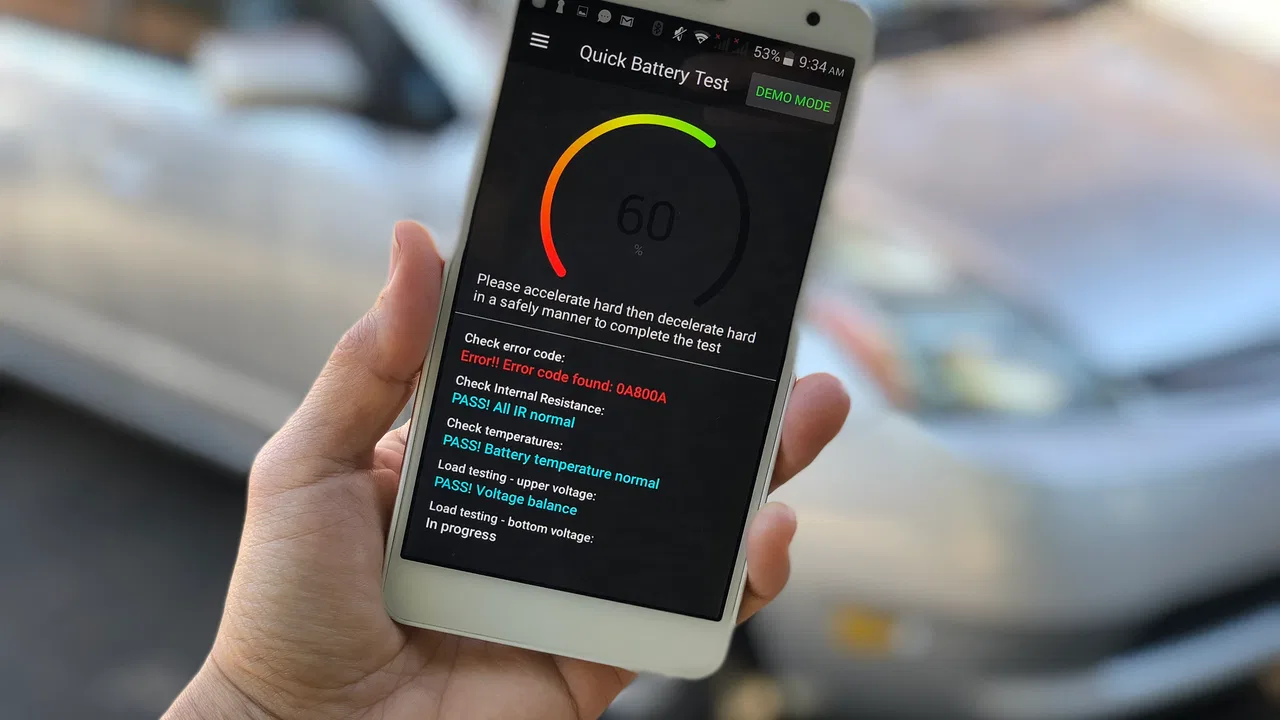
I approached Dr. Prius as a practical diagnostic tool rather than a general driving companion. It is an Auto & Vehicles app from Pika Tech LLC, designed for Toyota and Lexus owners who want to inspect the condition of a hybrid battery through a compatible vehicle connection. That focus makes it much more specialized than a normal fuel-log, navigation, or maintenance-reminder app.
My first impression is that its usefulness depends heavily on how seriously you want to understand your car. If you only need directions or a reminder for an oil change, this is far more technical than necessary. If you are considering a used hybrid, noticing unusual battery behavior, or trying to decide whether a battery concern deserves professional attention, the app has a much clearer purpose.
The app is free to install and is rated for Everyone, although the subject matter is really aimed at vehicle owners and people helping them. It has passed the point of being an obscure experiment, with over one hundred thousand installs, but its average rating of around three still suggests a mixed experience. I think that combination tells the story well: the idea is useful, but the results depend on vehicle compatibility, connection hardware, and the user’s ability to interpret automotive information.
You May Also Like

 Google Keep - Notes and lists
Google Keep’s Quiet Growth Shows the Appeal of Simpler Notes
As mobile work gets busier, Google Keep keeps winning a simple contest: capture a thought quickly, find it later, and get on with the day.

 Blood Strike: 2.5 Anniversary
Blood Strike’s Loadouts Turn Every Drop Into a Tactical Gamble
A close look at Blood Strike’s custom loadouts: how fast access to signature weapons reshapes its battle royale rhythm, rewards preparation, and narrows the gap between fights.

 Pandora - Music & Podcasts
Pandora’s Music Is Easy to Start, but Harder to Recover
Pandora’s strength is its low-effort path from a seed to a station. Its weak spot is how much confidence it asks you to place in connection, setup, and quiet recovery.

 8 Ball Pool
 Is Built on Rivalries, Rematches, and Routine
A close look at the rivalries, rematches, shared routines, and unanswered safety questions that turn a quick pool match into a persistent mobile community.

 Samsung Music
’s Quiet Strength Is Playing What You Already Own
Its reach comes less from spectacle than from dependable access to a personal library. That simplicity is both the app’s strongest retention engine and its ceiling.

 AccuWeather: Weather Radar
AccuWeather Review: A Quick, Clear Forecast for Everyday Decisions
For everyday plans, the best forecast is the one you can understand quickly. AccuWeather makes rain timing, radar, and local conditions easy to act on, with a few trade-offs.
More From Our News Desk



How it fits into a shared household
In a shared home, this section is about turning different drivers’ impressions into one calm, useful conversation. I find it helps to agree in advance who will run a check and who will keep the notes, so a single reading does not become a household verdict. That kind of coordination begins with a clear understanding of what the setup can—and cannot—connect to.
A useful tool when one car belongs to several people
In a household where several people use the same Toyota or Lexus hybrid, a battery-monitoring app can answer questions that otherwise become vague conversations. One driver may notice the engine running more often, another may see the battery indicator changing quickly, and a third may simply worry because the car feels different. A shared diagnostic session gives everyone the same starting point instead of relying on separate impressions.
I would use it during a planned check rather than handing the phone to every driver while the car is moving. The owner can connect the device while parked, review the readings, and then explain the result to the other household members. That simple routine matters because the app is not a dashboard replacement. Its value comes from deliberate inspection, not from constantly watching technical values during an ordinary trip.
There is also a practical benefit when a family shares responsibility for maintenance. One person may handle appointments, another may drive the car daily, and someone else may be deciding whether to buy a used replacement vehicle. The app can help organize the discussion around the hybrid battery instead of leaving one person to make a decision based only on a warning light or a mechanic’s first impression.
A realistic everyday scenario
Imagine that a household is preparing for a long trip and the hybrid has started behaving differently in traffic. The driver is not necessarily facing an immediate failure, but the battery seems to charge and discharge more noticeably than before. I would park safely, connect the compatible interface, run the relevant test, and save the observations in a simple note with the date and driving conditions.
The important part is not treating one result as a final diagnosis. I would repeat the check under comparable conditions, then take the information to a qualified technician if the pattern remained concerning. This is one of the app’s strongest household uses: it can help decide whether a vague concern deserves further investigation, while keeping the final repair decision with a professional.
That workflow also prevents a common mistake. A family member who sees an alarming-looking value might immediately assume the battery must be replaced. Instead, I would compare the result with the car’s behavior, warning messages, service history, and the advice of someone who understands hybrid systems. The app can make a conversation more concrete, but it should not turn a non-specialist into a battery engineer overnight.
What shared use does not mean
Shared use is possible in the ordinary sense that different people can take turns using the same phone and vehicle. I would not treat it like a family platform with separate profiles, child accounts, or automatic household reporting. The app’s job is vehicle monitoring, not managing people or assigning permissions between drivers.
That boundary is important for privacy and responsibility. If several adults use one device, they should agree on who connects the adapter, who records observations, and who decides when a professional inspection is needed. Keeping those roles clear reduces the chance that someone changes a setting, disconnects equipment at the wrong moment, or misunderstands a technical result.
Setup, connection boundaries, and the learning curve
For a first-time user, the key question is not simply how to install the app, but how to make a safe, compatible connection without rushing into interpretation. I would treat the first session as a basic communication check and leave paid features or deeper testing until the vehicle and interface work reliably together. That naturally raises the next issue: how to share observations without confusing them with conclusions.
The hardware question comes first
The most important setup issue is not the download itself. The app needs a compatible way to communicate with the vehicle, so a user should think about the required connection hardware before expecting instant results. This is where many people may become frustrated: installing an app is simple, but obtaining the right interface and making it communicate reliably with a particular Toyota or Lexus hybrid is a separate task.
I would check compatibility before purchasing any accessory and before planning a diagnostic session. A phone, the app, and a vehicle are not automatically enough just because all three are present. Connection standards, adapter quality, phone behavior, and the specific car can all affect the experience. The app is therefore best viewed as one part of a diagnostic setup rather than a complete tool by itself.
Once connected, I would begin with the least complicated function available and avoid changing several things at once. A first session should be about confirming that the car is recognized, the readings remain stable, and the phone does not lose communication. Only after that would I explore testing or more detailed monitoring. This staged approach is especially helpful when the car is shared, because it gives other household members a clear explanation of what is happening.
Why a calm setup matters
Hybrid battery checks are not something I would rush in a driveway while another person is waiting to leave. I prefer a parked location, enough time to read the screen, and a second person available if the phone needs to be handled while the vehicle remains safely stationary. The app may be used around a running vehicle, so common-sense safety matters more than convenience.
I would also avoid judging the battery from a single glance. Readings can be affected by temperature, recent driving, traffic conditions, and the vehicle’s current state. A useful personal record should include what the car had been doing before the test: a cold start, a long highway drive, stop-and-go traffic, or a period of sitting unused. That context makes later comparisons far more meaningful.
A non-obvious advantage of this method is that it turns the app into a small observation system. Instead of opening it only when panic starts, I can use it at sensible intervals and compare similar situations. That does not create a laboratory diagnosis, but it is more informative than relying on memory. It also helps a household explain a problem clearly when visiting a repair shop.
Android requirements and version context
The current version is 6.70 and it requires Android 5.0 or later. That keeps the basic operating-system requirement accessible to many older phones, which is useful if a household has a spare Android device available for car checks. However, meeting the Android requirement does not guarantee that every phone, adapter, or vehicle combination will behave identically.
I would dedicate an older spare phone only after testing the connection. A phone that is fine for occasional browsing may have an aging battery, unstable wireless behavior, or a screen that is difficult to read in sunlight. Those practical details can matter more during a vehicle test than the operating-system number itself.
Where the free model ends
The app is free, which makes it easier to explore before committing money to the idea. It also includes in-app purchases ranging from about fifteen dollars to about thirty-nine dollars per item. I would not assume that installing the free version gives access to every diagnostic capability. Before paying, I would first confirm that the connection works and that the available information is relevant to my exact reason for using the app.
This is a meaningful trade-off compared with a basic code reader. A simple reader may be cheaper or more familiar for checking a conventional fault code, while this app is aimed at understanding the remaining condition of a Toyota or Lexus hybrid battery. If the battery-specific information is what I need, the purchase may be easier to justify. If I only want to clear a warning or read ordinary engine codes, another tool may be a better fit.
Coordinating information between drivers
When several people drive one car, each person may notice a different symptom or use the hybrid in different conditions. I would keep the observations together while distinguishing what the app displayed from what a driver inferred; that makes later comparisons more useful and conversations with a technician clearer. A consistent record also gives families a better basis for deciding who should act on the information.
Make one person responsible for the record
When a car is shared, inconsistent testing can create more confusion than clarity. I would choose one household member to keep the notes, even if other drivers participate. The record can include the date, approximate mileage, recent driving conditions, visible warning messages, and the result of the app’s check. There is no need to make it complicated; the goal is to preserve context that would otherwise disappear.
This is particularly useful when one driver uses the car for short urban trips and another drives long distances. Their experiences place different demands on the hybrid system, so comparing comments without noting the driving pattern can lead to unfair conclusions. A battery that behaves differently after heavy stop-and-go use may need a different interpretation from one that behaves differently after a long, steady journey.
Separate observation from interpretation
I recommend writing down what the app shows separately from what the household thinks it means. For example, the record can first describe the observed behavior, then note whether the car felt normal, sluggish, noisy, or unusually dependent on the engine. This small separation helps prevent a nervous driver from turning a technical reading into a definite repair diagnosis.
It also makes communication with a mechanic more efficient. Instead of saying that the battery is “bad,” a driver can explain when the unusual behavior appeared, how often it happened, and whether the app showed a repeatable pattern. That is a more responsible use of a consumer diagnostic tool and one of the clearest ways to get value from it without overestimating its authority.
Use it before buying, not only after a problem appears
For a household considering a used Toyota or Lexus hybrid, this app can be part of a broader inspection routine. I would test the vehicle only with the seller’s permission, keep the car safely parked, and treat the result as one piece of evidence alongside service records, a road test, physical inspection, and professional advice.
The trade-off is that a test can increase confidence without eliminating risk. A reassuring result does not transform an older vehicle into a risk-free purchase, and a concerning result should not be interpreted without considering the car’s history. Still, having a battery-focused check available is more useful than relying only on the seller’s description or a generic visual inspection.
Age, trust, and responsible use
An Everyone age rating makes the app broadly accessible, but it does not make vehicle diagnostics a child’s responsibility. I would have an experienced adult handle the car and connection, while younger users can observe or help record results. Trust depends on safe handling and honest context, especially when a screen might otherwise be treated as proof of a repair decision.
Everyone can download it, but not everyone should operate it alone
The content rating is Everyone, yet the practical context is automotive. I would be comfortable with a teenager helping record observations or learning how hybrid systems work, but I would not encourage unsupervised experimentation around a running vehicle or unfamiliar diagnostic hardware. The age label describes access to the app, not a replacement for adult judgment around a car.
For a family, the safest arrangement is simple: an experienced adult handles the connection and the vehicle, while younger household members observe, ask questions, or write down results. That turns the app into an educational aid without pretending that a technical screen is harmless just because it is on a phone.
Do not use a phone result to settle a family argument
Shared vehicles often create disagreements about maintenance. One person may want to replace the car immediately, while another may dismiss every concern as normal hybrid behavior. I think the app is most valuable when it lowers the temperature of that argument. It provides a structured reason to gather observations, but it should not be used as a weapon to prove that one driver is right.
Trust also means being honest about who performed the test and under what conditions. If someone connects an adapter incorrectly, tests after an unusual drive, or records only the most alarming screen, the household may reach a distorted conclusion. A short, consistent process is more trustworthy than a dramatic one-off result.
When another option is better
I would skip this app if I do not own a compatible Toyota or Lexus hybrid, do not want to buy or manage connection hardware, or simply need a general maintenance reminder. It is also not my first choice for someone who cannot interpret vehicle information and has no experienced person available to help. In those cases, a trusted repair shop or a simpler diagnostic reader may save time and reduce anxiety.
I would also choose professional service first when the vehicle has a warning light, severe drivability problem, burning smell, visible damage, or any symptom that makes continued operation questionable. A phone-based check should not delay urgent attention. The app is better for investigation, preparation, and ongoing awareness than for replacing a qualified inspection.
My household verdict
After looking at it as a shared-car tool, I see Dr. Prius / Dr. Hybrid as a focused option for Toyota and Lexus hybrid owners who want more insight into battery condition than a normal vehicle app provides. Its strongest role is helping a household move from vague concern to organized observation. It can support a used-car inspection, prepare better questions for a mechanic, and give several drivers a common record of what the vehicle is doing.
Its limitations are just as important. The setup may require compatible hardware, the technical information can be easy to overinterpret, and the free download does not mean every useful capability is included without an in-app purchase. The mixed average rating of around three reflects why I would approach it with realistic expectations rather than assuming a perfect plug-and-play experience.
For me, the deciding question is not whether every driver in the home can open it. The better question is whether someone in the household is willing to use it carefully, record conditions consistently, and accept that a professional may still be needed. If the answer is yes, this specialized Auto & Vehicles app can be a worthwhile addition to a hybrid owner’s toolkit. If the answer is no, I would spend the effort on a qualified inspection instead.
My recommendation is cautious but positive: install it when you have a specific Toyota or Lexus hybrid battery question, verify the connection before paying for extra functions, and use every result as evidence rather than a final verdict. That approach gives the app room to be genuinely helpful without asking it to do a mechanic’s job.
FAQs for Dr. Prius / Dr. Hybrid
01What is Dr. Prius / Dr. Hybrid, and how does it work?
Dr. Prius / Dr. Hybrid is an app designed to monitor and diagnose the health of your hybrid vehicle's battery. It connects to your car via an OBD2 Bluetooth adapter, providing real-time data and insights. The app offers features like battery life expectancy, live data monitoring, and diagnostic trouble codes, helping users maintain optimal vehicle performance.
02Is Dr. Prius / Dr. Hybrid compatible with all hybrid vehicles?
Dr. Prius / Dr. Hybrid primarily supports Toyota and Lexus hybrid models, but it also works with some other brands. It's important to check the app's compatibility list on the developer's website or within the app store description to ensure it supports your specific vehicle model before downloading.
03What are the costs associated with using Dr. Prius / Dr. Hybrid?
While the app itself is free to download, some features require in-app purchases. These premium features include advanced diagnostics and battery life expectancy tests. Additionally, you'll need to purchase an OBD2 Bluetooth adapter, which is necessary to connect your smartphone to your vehicle for data retrieval.
04How user-friendly is the Dr. Prius / Dr. Hybrid app for non-technical users?
Dr. Prius / Dr. Hybrid is designed with a user-friendly interface, making it accessible to both technical and non-technical users. The app provides clear instructions and visual guides to help users navigate the features. However, some technical knowledge about hybrid vehicles can enhance the overall experience and understanding of the data provided.
05Are there any privacy concerns when using Dr. Prius / Dr. Hybrid?
Dr. Prius / Dr. Hybrid prioritizes user privacy by ensuring that data collected from the vehicle is not shared with third parties. The app requires minimal permissions, focusing solely on vehicle diagnostics. Users should review the privacy policy within the app to understand how data is handled and ensure their comfort with the app’s data practices.
Pros
- Real-time battery monitoring.
- User-friendly interface.
- Comprehensive vehicle support.
- Accurate diagnostic tools.
- Regular updates.
Cons
- Requires OBD2 adapter.
- Limited free features.
- Steep learning curve.
- Occasional connectivity issues.
- Paid version needed for full access.

Dr. Prius / Dr. Hybrid
Gallery